
Software
Novice SQL Format
A Windows T-SQL formatter for SQL Server scripts, with side-by-side previews, reusable profiles, and clear formatting diagnostics.
- Version
- 0.1.0.33
- Platform
- Windows (x64)
Novice SQL Format is a desktop SQL formatter for developers, database administrators, and data analysts working with Microsoft SQL Server. Make dense queries and database scripts easier to read, using a consistent style you can review before applying.
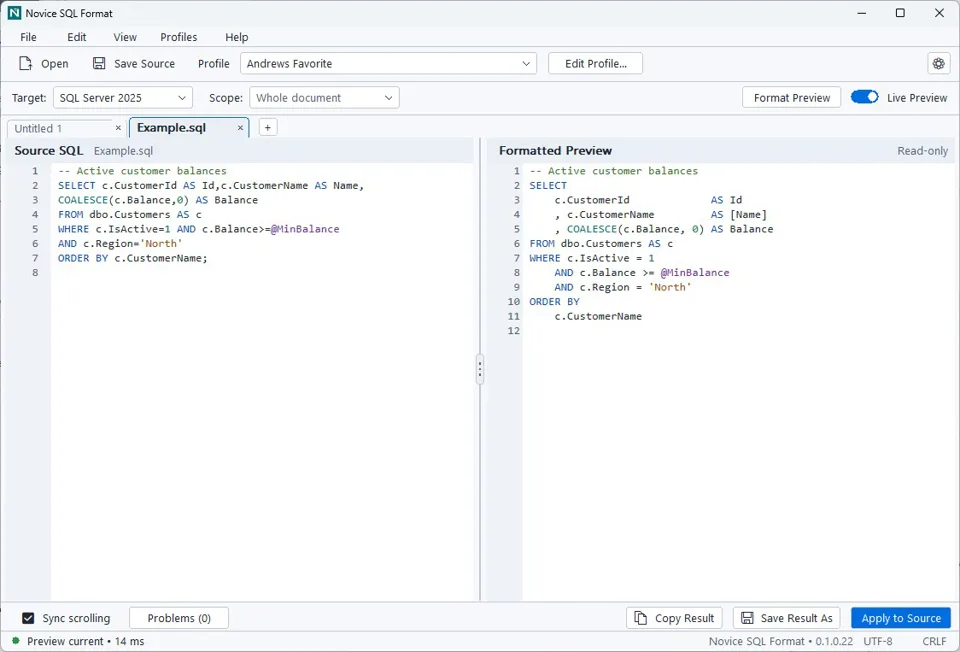
SQL formatting profiles that fit your work
- Start with five bundled profiles, including compact, expanded, aligned, and leading-comma styles.
- Search formatting settings by category, inspect examples, and preview changes against your current SQL.
- Save named custom profiles or use Save Profile As to create a separate style without replacing a bundled profile.
- Keep each document's formatting profile and SQL Server target independent in its own tab.
See the result before changing your SQL
Source SQL and the read-only formatted preview appear side by side with syntax highlighting. Use Live Preview while editing, or request a fresh preview when you are ready. Profile changes do not automatically replace the source.
- Copy the result, save it as a separate file, or explicitly apply it to the source as one undoable change.
- Resize the split panes, synchronize scrolling, and adjust both SQL panes with synchronized zoom.
- Choose Light, Dark, or Follow system appearance.
Work across queries and database scripts
Formatting covers supported SELECT queries, joins, CTEs, window functions, data modification statements, table and index definitions, stored procedures, and procedural SQL. Choose a SQL Server target of 2016, 2017, 2019, 2022, or 2025. Coverage depends on the construct and selected formatting options; these targets are not a complete compatibility certification.
Diagnostics that point back to the source
The Problems panel explains reported issues and shows their locations when available. Source underlines and gutter markers help you find the affected text; select an issue or use F8 and Shift+F8 to move between locations. Copy Selected or Copy All Problems creates a report without automatically including your source SQL.
If formatting cannot complete, the preview is clearly labeled as original SQL rather than formatted output. Routine preservation notes stay in a separate Formatting Details window, keeping meaningful warnings and errors easier to find.
Local processing, without a database connection
SQL code formatting runs locally. The application does not connect to a database or execute your SQL. Parser and preservation checks guard changes, and quoted dynamic or pass-through SQL is left unchanged. Review the result before using it; formatting is not proof that a script will execute correctly.
Optional diagnostic logging is off by default and stays local. Its records exclude SQL contents, literal values, credentials, and file paths.
Getting started
- Run the Windows application and paste SQL or open a supported text file.
- Choose a formatting profile and the intended SQL Server target.
- Review the source and preview, checking Problems or Formatting Details when needed.
- Copy the formatted result, save it separately, or deliberately apply it to the source.
Availability and current boundaries
The current development preview is version 0.1.0.33 for Windows x64. It is packaged as a single application EXE, with settings and custom profiles in a separate local folder. Minimum Windows-build support and clean-machine validation are not yet finalized.
This development build can format SQL through June 9, 2027. After that date, existing SQL can still be viewed, copied, and saved, but further formatting requires a newer build.
This is a SQL Server T-SQL formatter, not a general-purpose formatter for every SQL dialect. SSMS integration, batch formatting, selected-region formatting, profile import/export, and session or crash recovery are not included in the current build.
Questions about Novice SQL Format?
Email info@noviceacressystems.com to ask about the application or discuss your SQL formatting requirements.